A general chatbot · verbatim
can you help me with this?
Yes! Your substitution is exactly right:
Let
Change the limits:
- When ,
- When ,
So the integral becomes
Integrate:
It ends with the answer, in a box.
Corollary · high school to PhD
Corollary is a tutor for iPad and Apple Pencil. Work the problem by hand and Cora reads the page as you go. Stuck? She writes the next step beside your work, not the answer. Wrong? She marks the line.
Free for 14 days, everything on. No card. I’m a parent
The demo is an illustration · every recording below is the real app
Available for iPhone and iPad. Coming soon to Android and the web.
An illustration of one moment on the canvas. Her words are from a real session; the recordings further down are the real app.
Learn anything. Cora shows you how.
Why not just use a chatbot
A chatbot is great at the answer. It will finish your problem faster than Cora will. Then you have an answer you did not learn to reach. Cora reads your page, shows the method and marks the step that went wrong. Then you take the next step. We asked one model the same question twice, once plain and once as Corollary. Here is what came back.
A general chatbot · verbatim
can you help me with this?
Yes! Your substitution is exactly right:
Let
Change the limits:
So the integral becomes
Integrate:
It ends with the answer, in a box.
Cora · verbatim
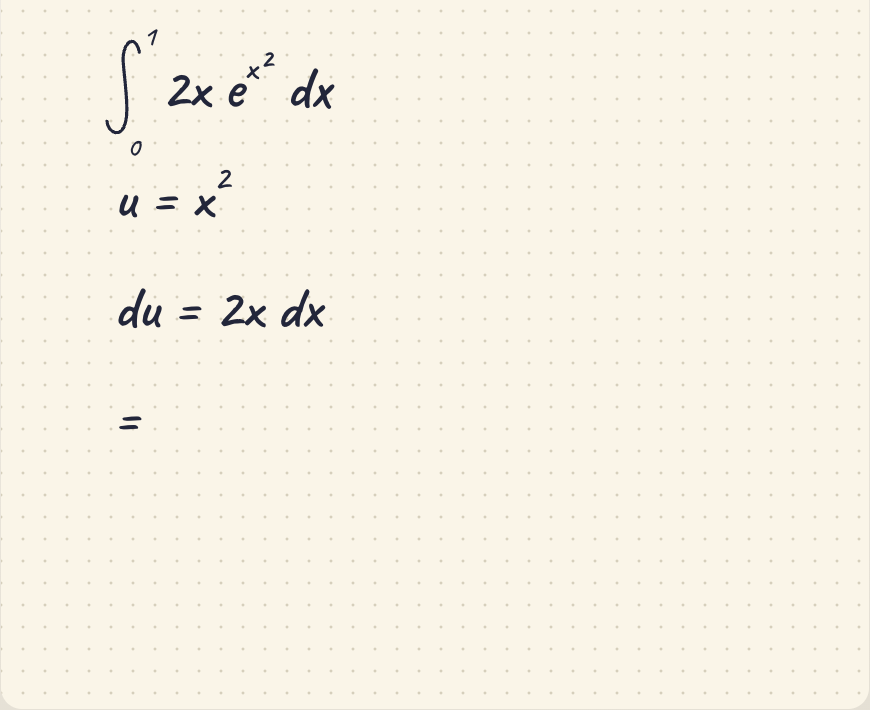
Cora
Your substitution is set up correctly. Now change the bounds using and rewrite the integral entirely in terms of .
What are and ?
It ends with a question for you.
Pick one. Each is the same question put both ways, side by side.
∫ x e^x dx
Using integration by parts, let u = x, dv = eˣ dx. Then du = dx, v = eˣ:
∫ x eˣ dx = x eˣ − ∫ eˣ dx = x eˣ − eˣ + C
(x − 1) eˣ + C
It ends with the answer in a box.
Try integration by parts:
∫ u dv = uv − ∫ v du.
Choose one factor to differentiate and the other to integrate. A natural choice is
u = x, dv = eˣ dx.
Then compute du and v, and substitute into the formula. What expression do you get?
It ends with the ball in your court — and in the app “integration by parts” is a link rather than a phrase, worth a definition and a drill without leaving the answer.
Ten characters in, and the replies have already forked. One hands you a boxed answer; one hands the problem back. Same model, same question — the only difference is who is expected to finish it.
The same handwritten page to both — parts set up right, the sign lost on the last line
“Almost — the integration by parts setup is correct, but there’s a sign error in the last step.”
Then the whole thing again, its way, ending:
−(x + 1) e⁻ˣ + C
It read the photo and it found the error. It also finished the problem, and the correction lives down here, under your page.
“The integration-by-parts setup is correct; the only issue is the sign when integrating e⁻ˣ in the last step.”
And, in the same reply, a mark placed on the page itself:
= −x e⁻ˣ − ∫ −e⁻ˣ dx
= −x e⁻ˣ + e⁻ˣ + C
{"kind":"ellipse","cx":650,"cy":360,"rx":80,"ry":25}
Real pixel coordinates on your page, and that is where the ring lands.
Both of them found the sign. Only one of them could point at it — on your line, in your handwriting, where you will be looking.
“i expanded (2x−3)^2 and got 4x^2 − 9. check my step”
Your expansion missed the middle term. Use (a − b)² = a² − 2ab + b²:
(2x − 3)² = 4x² − 12x + 9
Correct. It is also exactly as confident when it is wrong, and on a longer expression you have no way to tell those two apart.
The same correction — and then she puts her own claim through the checker, and the server answers:
✗ Equivalence check — expanding (2x-3)^2 — (2*x-3)^2 vs 4*x^2 - 9: NOT equivalent — at x = 1.305, the left side is 0.1514 and the right side is −2.183.
That verdict is arithmetic, not phrasing. It is computed after she has written, at seeded sample points, and it would have contradicted her if she were wrong.
The same block backs a claim about units or a balanced equation, where agreement reads every element and the charge are conserved. Counted, not asserted.
Every tutor can tell you that you are wrong. This one can be checked on the spot, by something that does not care what it just said.
A substitution begun and broken off at “=” — you are working the next step out in your head
A chat box does nothing until you type. So you type, and it takes the page: substitution, changed limits, and
e − 1
“So the blank after du = 2x dx should be ∫₀¹ eᵘ du.”
It filled in the line you stopped on, and then it finished the problem. There is no setting for “not yet”.
It is already looking at the page, on its own, a few seconds after the pen stopped. Its entire reply:
<silent>
The rule it works to is explicit: speak only if you wrote it an instruction, or there is a definite error that will cost you, or you are visibly stuck, or you have finished and it is wrong. A line broken off mid-thought is none of those.
“An unnecessary silence costs nothing; an unnecessary interruption costs my train of thought.”From the instructions Cora is given, verbatim.
Same page, same second. A chatbot cannot help but finish the line you were ten seconds from reaching. Cora holds the one beat you don’t need her, so the thinking stays yours — then speaks up the moment a step actually costs you.
“ohh okay that makes sense, thanks!”
“You’re welcome!” — and the answer once more, for the road.
Nothing is written down, because there is nowhere to write it. The conversation is the only record, and it closes when you close the tab.
Following along felt exactly like understanding. From the inside the two are identical, and nothing here can tell them apart.
Asked the same thing, Cora is just as warm — the difference is not in the reply. It is that a row gets written, and how much that row is worth is fixed in advance by how hard it is to fake:
The weights the app actually uses. So “thanks!” lands at 0.20, and it is quietly out-voted the moment you get one marked.
Both of them said something kind. Only one of them also wrote down how much it was worth — and it does not believe your word over your work.
The sign you dropped, over the following nine days
A new chat. It has never met you, and the sign error is gone along with everything else you worked on.
You can paste the old thread back in — and then you are the one keeping the records, deciding what to revisit, and remembering on which day.
Nothing brings back the thing you were quietly about to forget, because nothing is tracking it.
The slip became a card, and the scheduler decides when you see it again. This is that card’s real life:
Run through the app’s own scheduler, FSRS, the one Anki adopted. The gap widens only because you keep getting it right, and it collapses the moment you do not.
A chat ends. A tutor keeps the thread, and hands it back on the day it is worth the most.
Neither reply in a verbatim panel is written prose. The four marked are word-for-word replies, captured by asking one model the same question twice — once with a bare “you are a helpful assistant” system prompt, once with the system prompt Corollary actually ships, with the same page attached where there is a page. Same model on both sides, so the only variable is the teaching. The two marked computed contain no model turn at all: those figures come from running the app’s own scoring and scheduling code, because what is claimed there is what gets recorded and when it returns, not what anyone says. Their chatbot column carries no mark, and deliberately: it is our illustration of how a fresh assistant behaves, not a capture of one, and a provenance label on something with no provenance would be the one mistake this section cannot afford. Replies are trimmed for length, never reworded, and the check verdict is quoted to the digit. The left column is a general assistant with no teaching prompt. Some tools now offer a study mode that asks questions first, and this comparison does not test those.
The shelf · 64 plans to start from
Pick a starting shape off the shelf, or tell Cora what you want in your own words. Either way the plan bends to your work, and paces to a deadline if you set one.
Chemistry · 4
General Chemistry
High school · 47 steps
Organic Chemistry
College · 45 steps
Physical Chemistry
College · 41 steps
Biochemistry
College · 39 steps
Physics · 9
Physics 1: Mechanics
High school · 39 steps
Physics 2: E&M, Thermo, Optics
High school · 41 steps
Physics C: Mechanics
College · 39 steps
Physics C: Electricity & Magnetism
College · 35 steps
Classical Mechanics
College · 40 steps
Electromagnetism
College · 40 steps
Quantum Mechanics
College · 40 steps
Thermodynamics & Statistical Mechanics
College · 35 steps
Astronomy
College · 36 steps
Biology · 5
High-School Biology
High school · 45 steps
Environmental Science
High school · 44 steps
Molecular & Cell Biology
College · 45 steps
Genetics
College · 39 steps
Neuroscience
College · 41 steps
Economics · 5
Microeconomics
High school · 46 steps
Macroeconomics
High school · 43 steps
Intermediate Microeconomics
College · 45 steps
Intermediate Macroeconomics
College · 38 steps
Econometrics
College · 36 steps
Humanities · 14
Psychology
High school · 46 steps
US Government & Politics
High school · 42 steps
Human Geography
High school · 41 steps
English Composition & Literature
College · 42 steps
World History
College · 45 steps
Introduction to Philosophy
College · 44 steps
Art History
College · 45 steps
Linguistics
College · 43 steps
Religious Studies
College · 39 steps
Classics
College · 43 steps
Music Theory
College · 43 steps
Political Science
College · 44 steps
Sociology
College · 37 steps
Anthropology
College · 35 steps
Math · 27
Pre-Algebra
Middle school · 40 steps
Fractions & Decimals
Middle school · 36 steps
Ratios, Rates & Proportions
Middle school · 35 steps
Middle-School Geometry
Middle school · 36 steps
Statistics & Probability
Middle school · 34 steps
Algebra 1
High school · 46 steps
High-School Geometry
High school · 44 steps
Algebra 2
High school · 42 steps
Trigonometry
High school · 38 steps
Precalculus
High school · 44 steps
Introductory Statistics
High school · 36 steps
Calculus (First Course)
High school · 39 steps
Calculus I
College · 39 steps
Calculus II
College · 37 steps
Multivariable Calculus
College · 36 steps
Linear Algebra
College · 35 steps
Ordinary Differential Equations
College · 38 steps
Discrete Mathematics & Proofs
College · 36 steps
Real Analysis
College · 34 steps
Abstract Algebra
College · 34 steps
Number Theory
College · 41 steps
Complex Analysis
College · 39 steps
Topology
College · 38 steps
Probability Theory
College · 38 steps
Partial Differential Equations
College · 40 steps
Numerical Analysis
College · 41 steps
Mathematical Statistics
College · 37 steps
The whole app
Everything here is on the iPad, shown as it is. Each subject gets its own tutor and its own notation, on the same canvas, plans and review.
01 · iPad · canvas
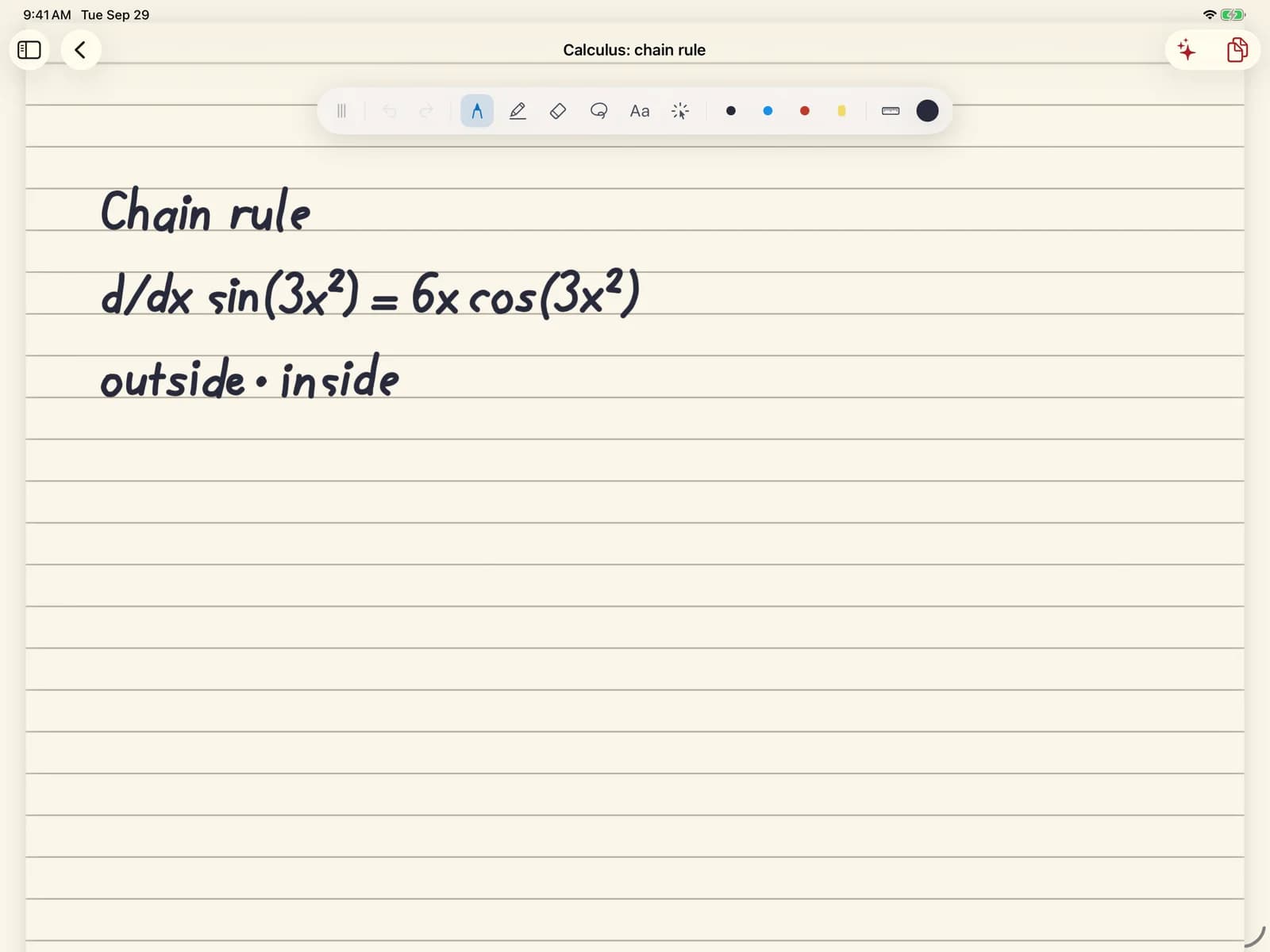
Leave the question on the page and pause. Cora reads what you wrote and puts the next step beside it, here the derivative of the inside, for you to keep or not. The rest is still yours to finish.
Real recording, sped up
02 · iPad · Web
Ask why something happens, and Cora writes and renders a short film on the page, where it stays and plays. This Riemann sum was made on the iPad, inside the circle drawn for it.
Real recording, sped up
03 · iPad · chat
Ask for a simulation and you get one to play with. Commit to a guess first, run it, change the string, and see whether you were right.
Real recording, sped up
04 · iPad · chat
Drag the point and the tangent follows, slope and all. Then Cora asks what happens to the tangent at the vertex.
Real recording, sped up
05 · iPad · iPhone
Import the assignment, a PDF or a photo, and ask about the one you're stuck on. Cora answers beside it: she gets you unstuck, she doesn't do it for you.
Real recording, sped up
06 · iPad · Web
Pages by hand or by keyboard, searchable later. Ask Cora about a page when you want her, and not before.
07 · iPad · iPhone · Web
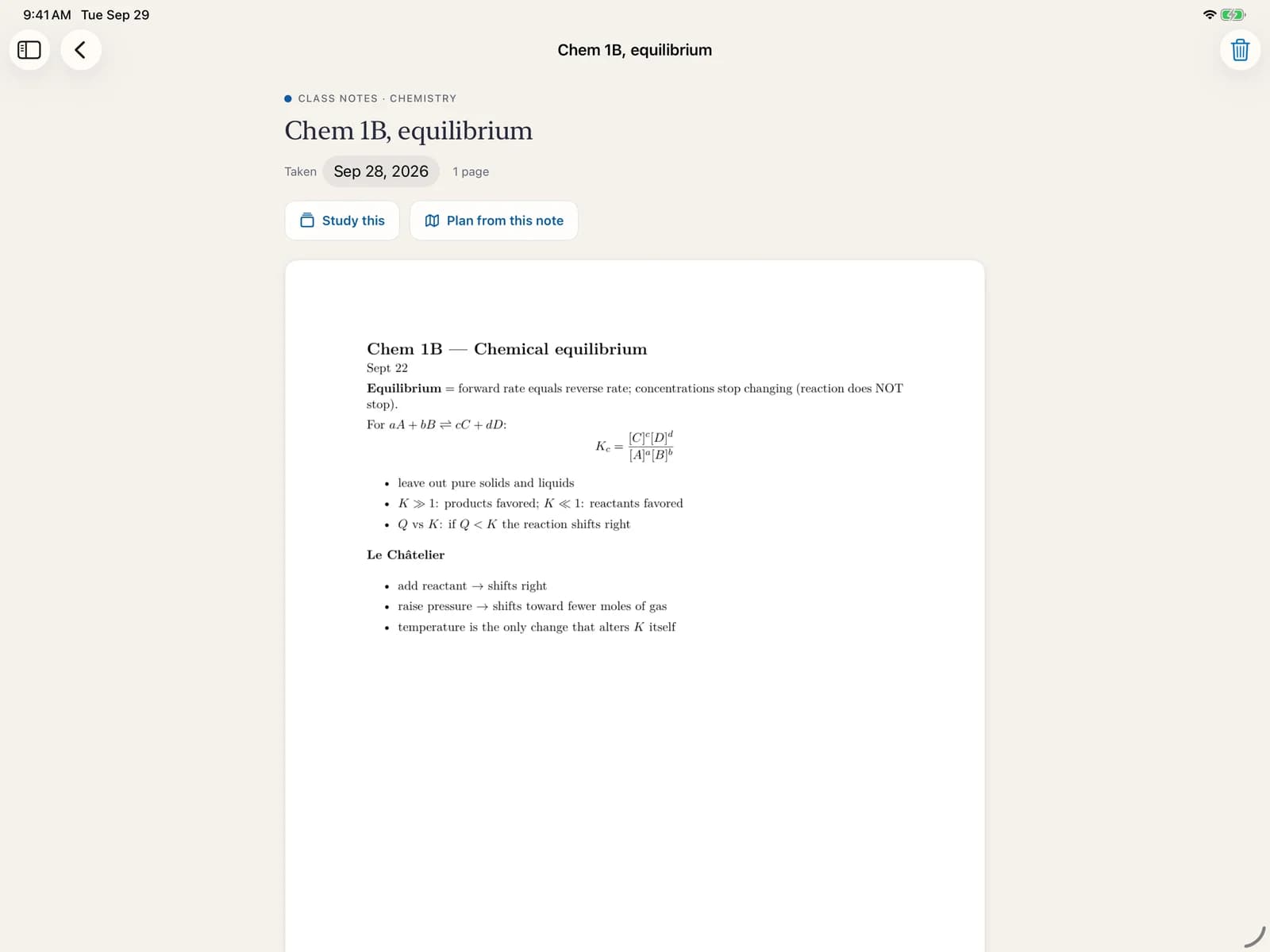
Upload the notes from lecture. Study straight from them, or build a plan out of one page.
08 · iPad · iPhone · Web
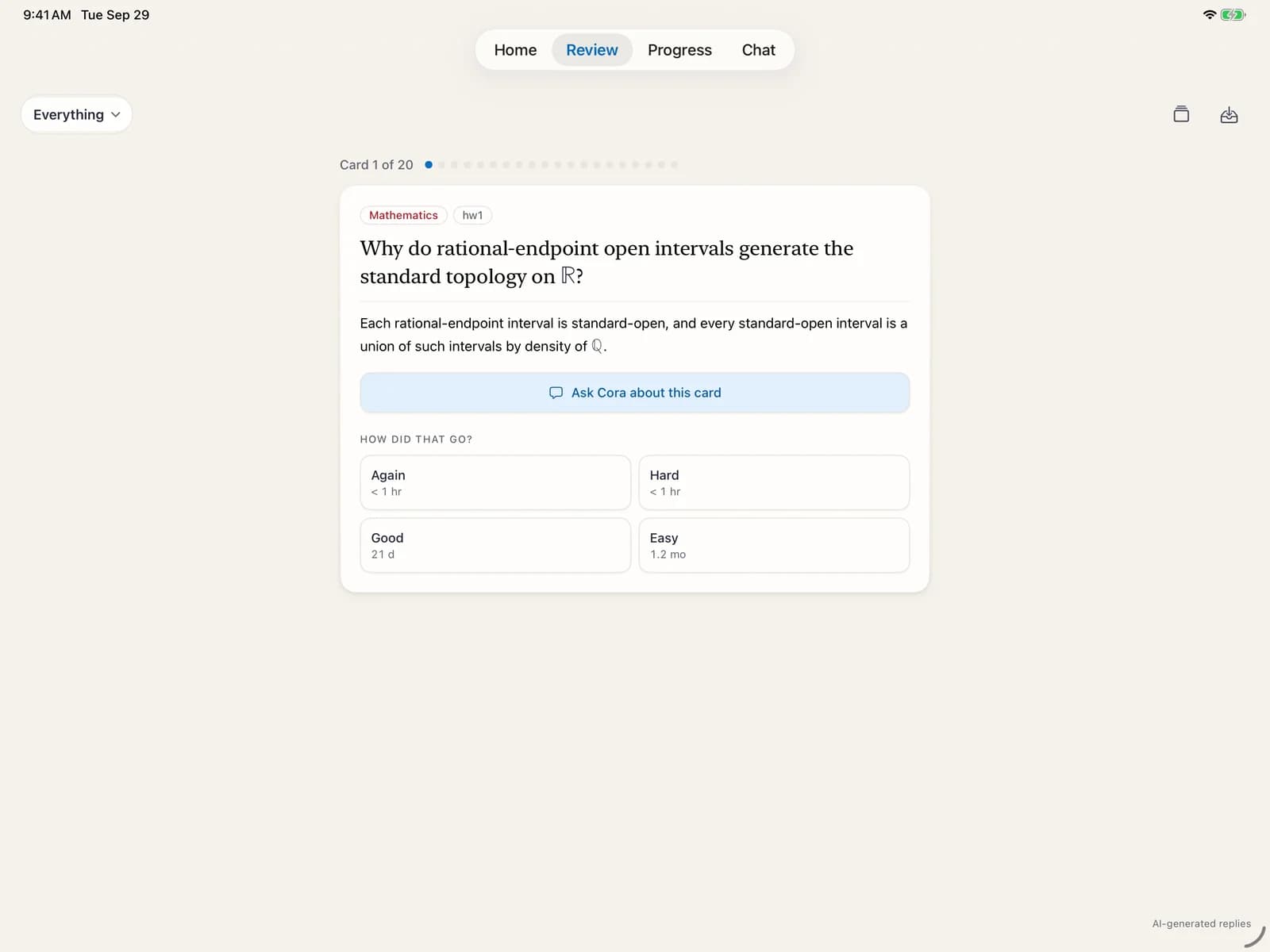
From what you read and what you got wrong, Cora writes the cards. They come back just before you'd forget, and you can ask her about any one.
09 · iPad · Web
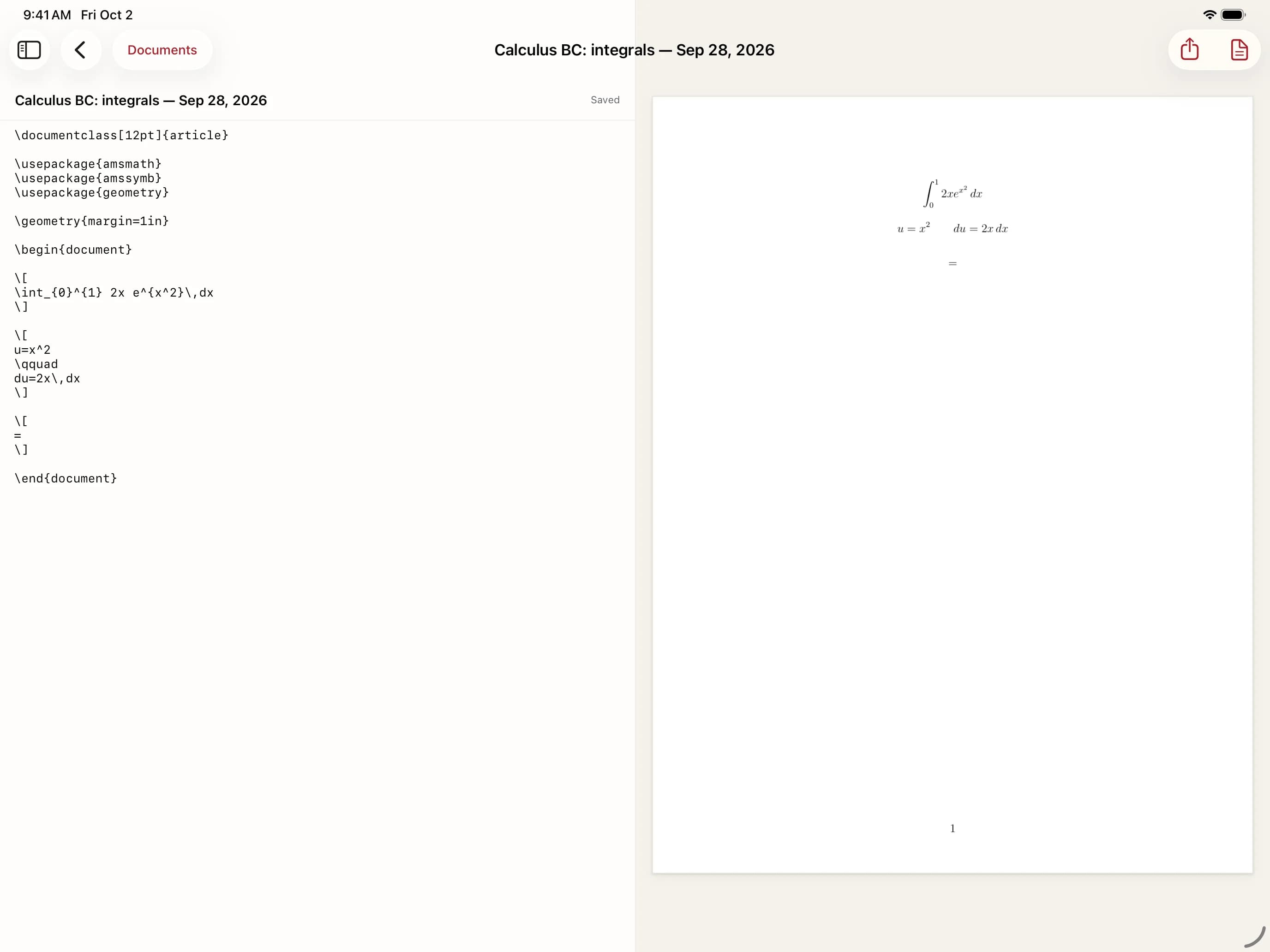
Turn a page of handwritten work into a LaTeX document, and see it typeset beside the source.
iPhone · Web
The iPad is where you work. The same account is on your iPhone for the minutes in between, and soon in any browser at a keyboard. What you miss on one turns up on the others.
“I keep your place. Pick up on whichever screen is nearest.”
Review between classes
Cards come due and you clear them in a minute. All three of these came from the midterm sat on the iPad.
Real recording, sped up
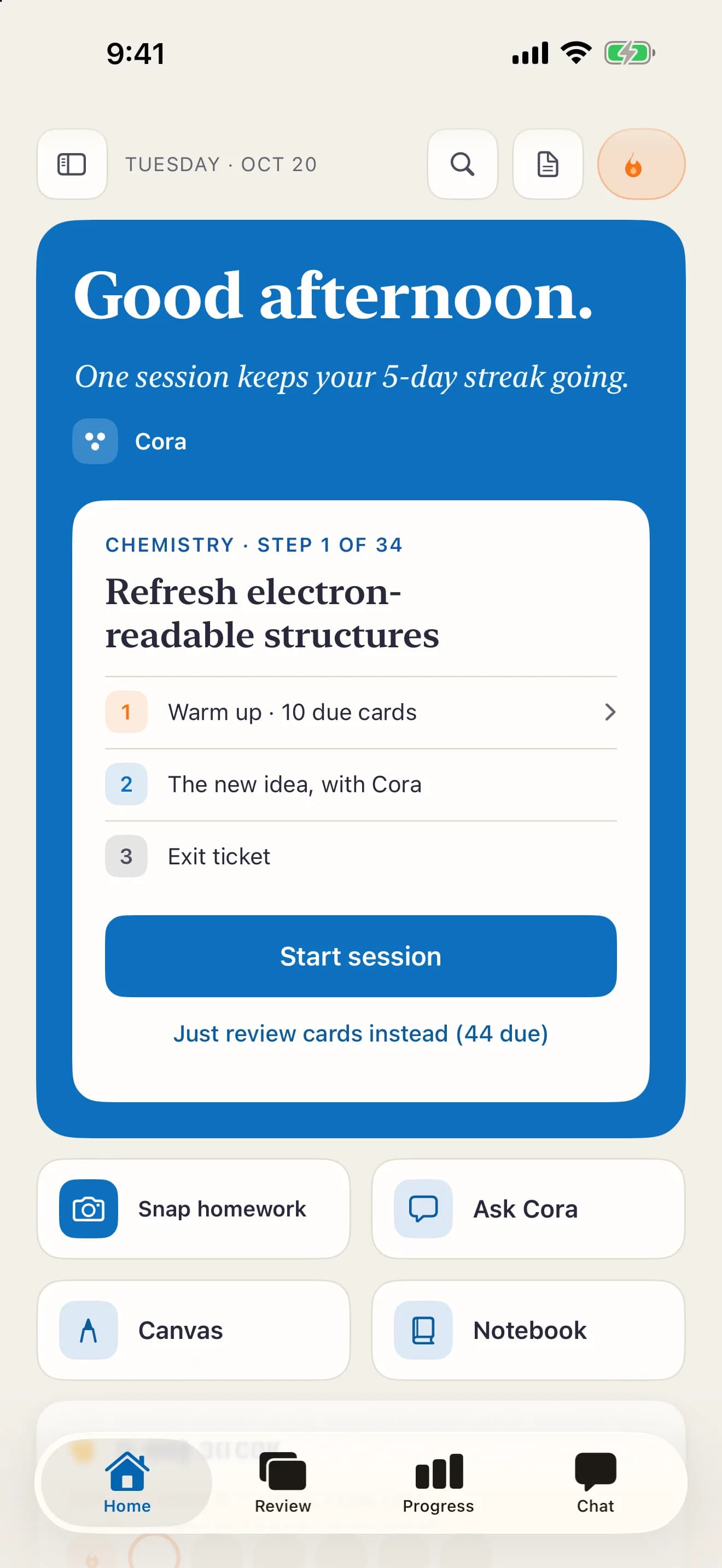
One session, ready to start
One session to start: the step you're on, with the cards that are due folded in as its warm-up.
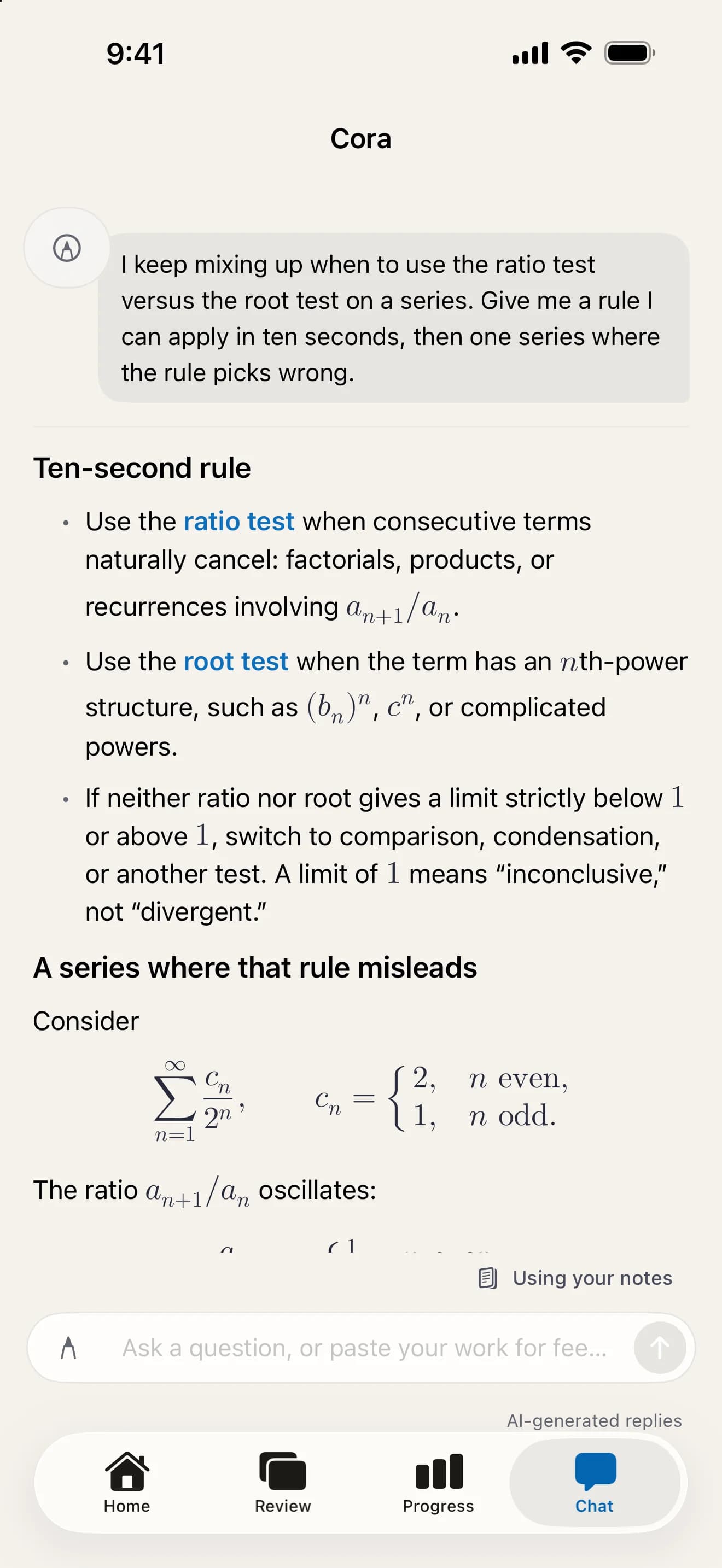
Ask, and the math comes typeset
Type the question on the bus. Cora's answer reads like a good textbook.
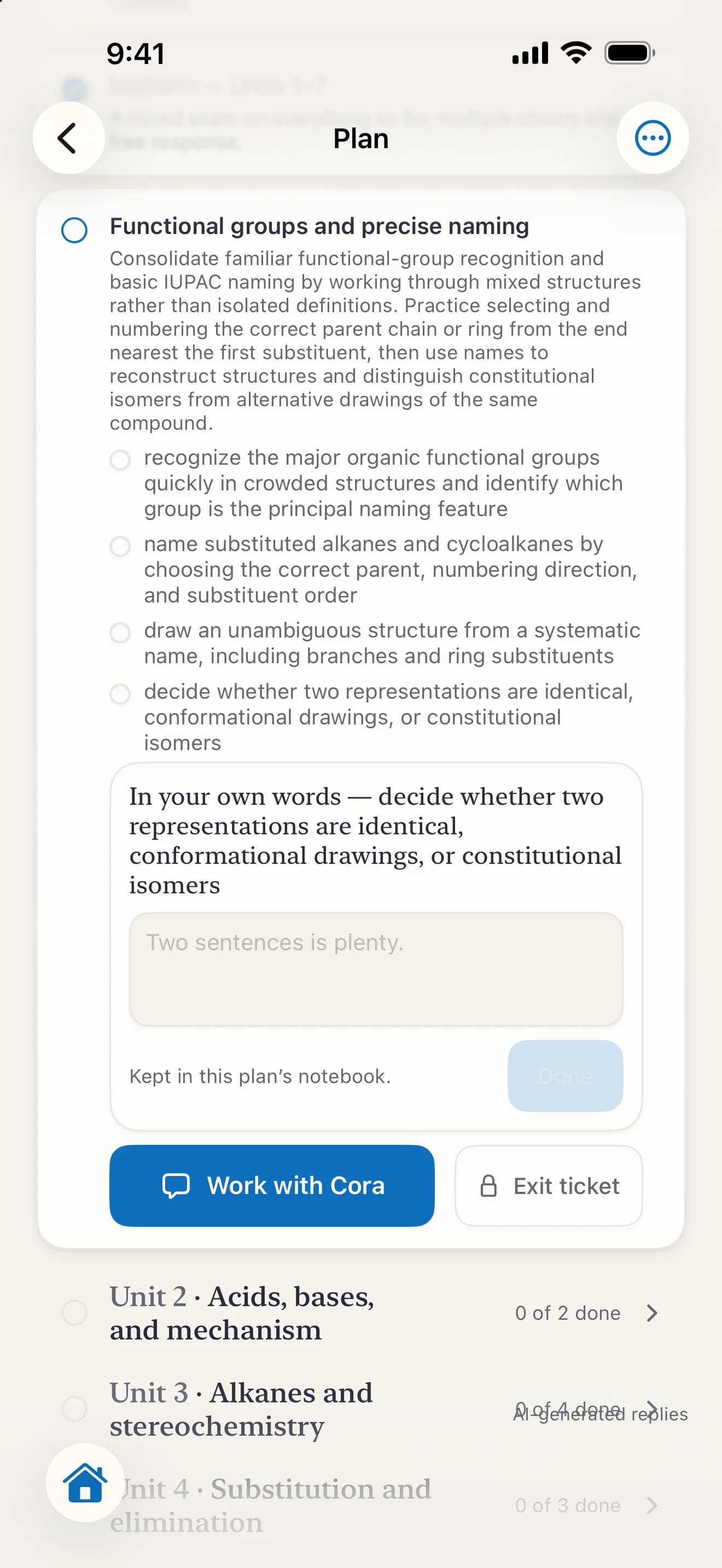
The step you're on
Check what's next in your plan, and work through it with Cora.
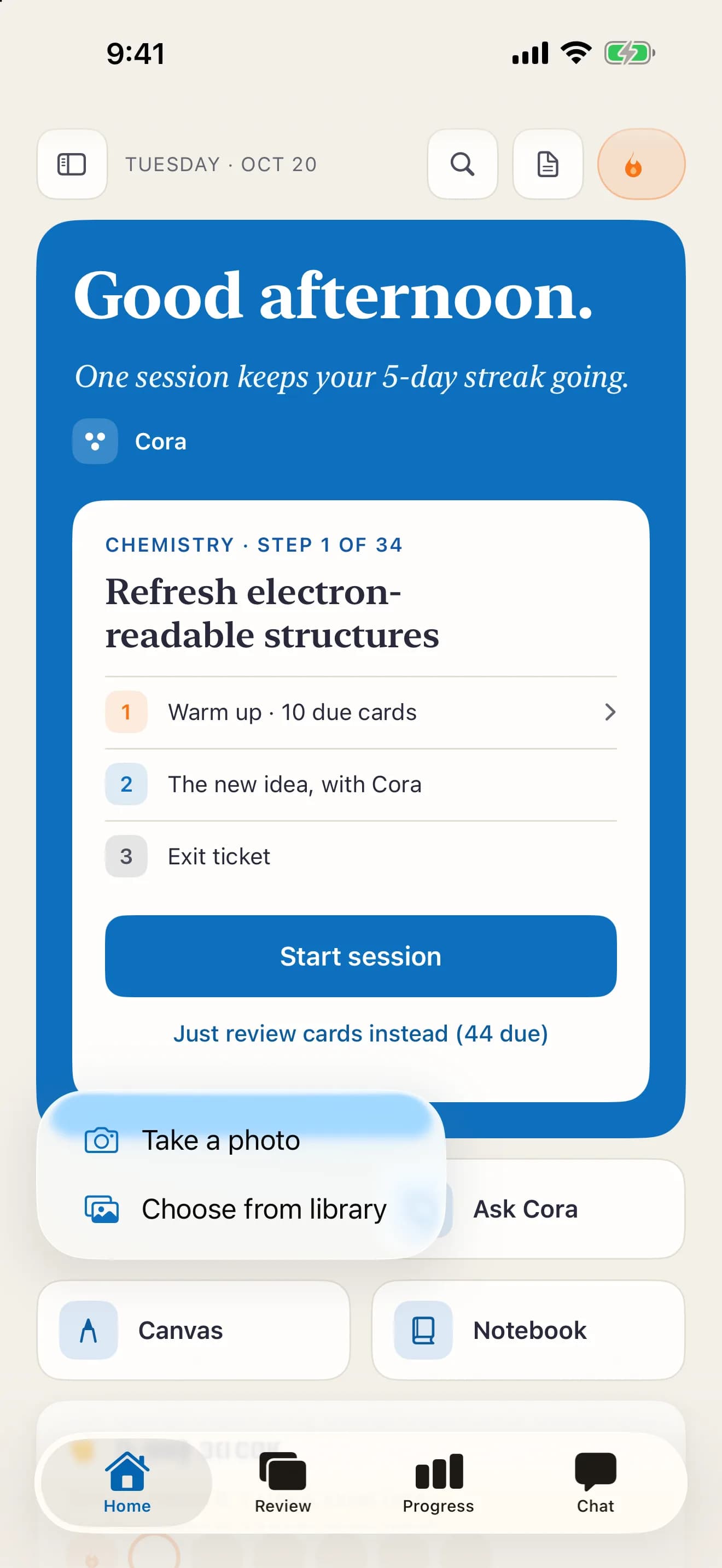
Snap the page
Photograph a worksheet or your notes and bring it to Cora.
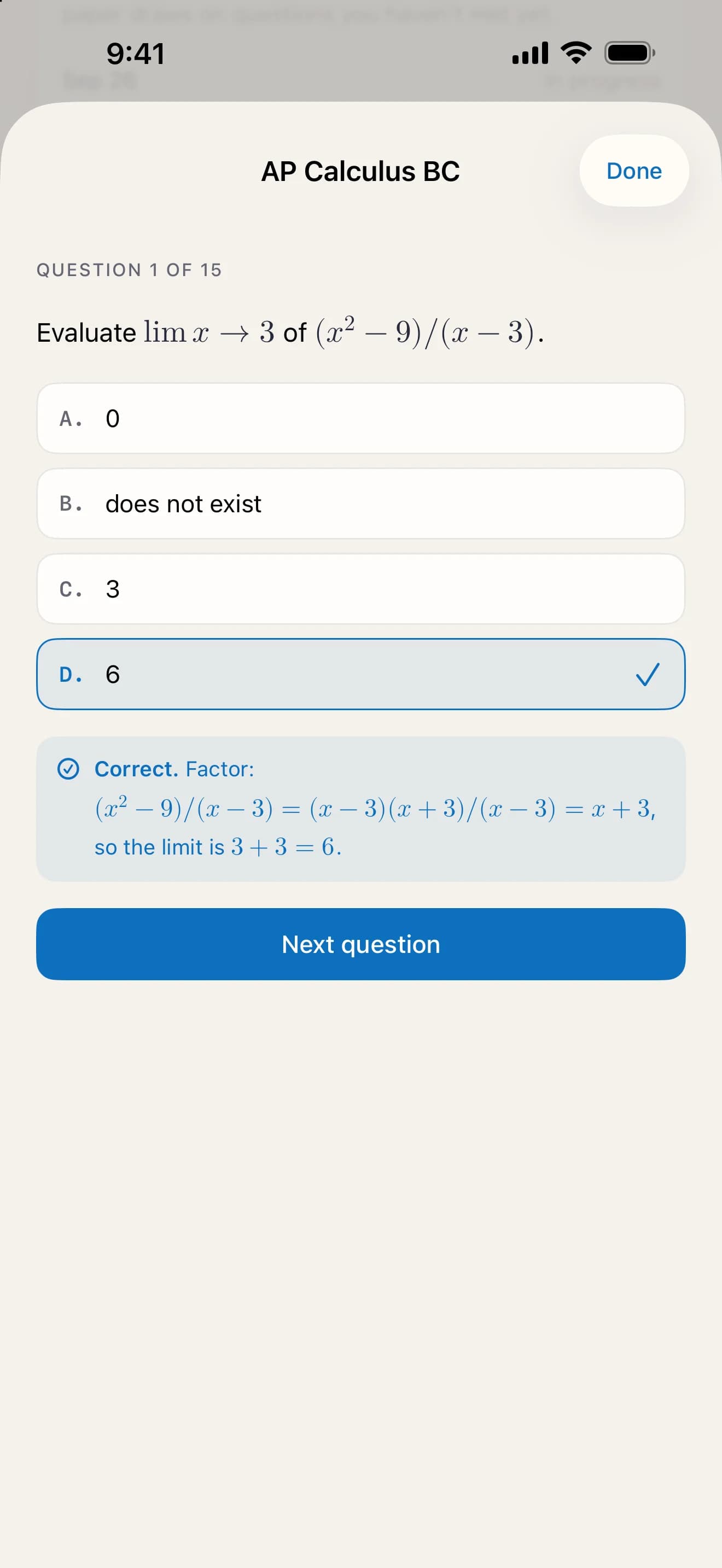
Practice in line
AP questions with the reasoning behind every answer, right or wrong.
The writing desk
Write an essay at a keyboard. Select any sentence and Cora answers in the margin: not a rewrite, a question about your evidence. Here she has asked what, specifically, links Sulla to Caesar.

The reading room
Read a chapter with her beside it. Your own note sits in the margin with her answer to it, and one click turns the section into review cards.

The same board, at a laptop
The page you wrote on the iPad opens in any browser: your handwriting where you left it, and the step Cora drafted after your equals sign. Carry on with a mouse or a trackpad.

Real captures of the iPhone app and the web version that is coming, on the same account.
Test Prep · AP, SAT and ACT
Everything above, aimed at a date. Test Prep builds your plan from the public course outline and paces it to your exam. It grades free response point by point, the way a reader does, and shows which units are still thin. It is a one-time add-on to Base, covering 13 AP courses and the SAT and ACT. You never need it to use Cora.
AP · 13 courses
AP prep, in depth
A plan from the course outline, full-length practice exams on the clock, and free response marked point by point.
SAT · ACT
SAT and ACT prep, in depth
Full-length timed practice tests, scored, with Cora coaching the questions you missed.
Each one brings its full outline, its own exam format, and free response graded on that course’s rubric. More subjects are on the way; the tutor itself already works in every subject, exam or no exam.
Try it: a practice question, worked by hand. Press Grade it.
A scripted walkthrough — the grading shape, not a live model call.
Water flows into a tank at a rate of R(t) = 20 + 4 sin(t/3) liters per minute for 0 ≤ t ≤ 12. Water drains from the tank at a constant 22 liters per minute. At t = 0 the tank holds 30 liters.
(a) ∫₀¹² (20 + 4 sin(t/3)) dt = [20t − 12 cos(t/3)]₀¹²
= 240 − 12 cos 4 + 12 ≈ 259.8 liters
(b) R′(t) = 4/3 cos(t/3), R′(6) ≈ −0.555. Decreasing.
(c) W′ = R(t) − 22 = 0 → sin(t/3) = ½ → t = 5π/2 ≈ 7.85
Max at t ≈ 7.85 min.
SAT and ACT
Full practice tests, timed and built the way each test is built. Every miss becomes a review card, and the plan paces to your test date. Cora coaches the test itself too: where your clock went, and the faster way through the question that ate it.
Reading and Writing · Math
English · Math · Reading · Science
If 3x + 7 = 22, what is the value of 6x + 14?
3x = 15, so x = 5
6(5) + 14 = 44 ✓
Your work. Right, in three minutes ten.
Right answer, slow road.
Look at what they asked for. 6x + 14 is exactly 2 × (3x + 7), so it is 2 × 22 = 44. No x needed.
When a question asks for an expression, check whether it is a multiple of one you already have. That is twenty seconds, not three minutes.
Where you stand is a band per section, read from your practice and labelled an estimate. Never a predicted score.
A scripted walkthrough — the report’s shape, not a live model call.
SAT is a registered trademark of the College Board, and ACT is a registered trademark of ACT, Inc. Neither was involved in or endorses this product. Practice questions are original, written in the style of each test, never real test items.
More on AP prep and SAT and ACT prep.
One plan covers 13 AP courses, the SAT and the ACT.
For parents
“I’m a machine, and I say so. I won’t pretend to be a person, and I’ll never talk anyone out of going to one.”— Cora
Corollary is for students aged 13 and over, and more of these questions are answered in the FAQ and on the page for parents.
Pricing
Try everything free for 14 days. Base is the whole tutor: every subject, the canvas, plans and review. Test Prep adds 13 AP courses and the SAT and ACT, as add-ons you pay for once and keep. You only need them if you’re sitting an exam.
Your everyday tutor.
or $200 a year ($16.67/mo) · two months free
$200 billed once a year · two months free
For the month, less than a single hour with a human tutor.
Choose BaseFull access. See if it clicks.
No card, so there is nothing to cancel if you stop.
Start freeAdd it to Base. Pay once, keep it.
Each add-on is one payment and yours to keep. Both together are $35. Needs a Base plan.
Start test prepEvery plan starts with the same 14-day trial, everything on and no card. After it, your work stays yours, and Cora needs a plan: Base for the everyday tutor, and a one-time Test Prep add-on for the exams. Nothing is ever charged without a plan you chose.
Launch pricing — the first cohort helps set the real numbers.
AP and SAT are registered trademarks of the College Board, and ACT is a registered trademark of ACT, Inc. Neither was involved in or endorses this product.
FAQ
Something not here? Write to us and a person answers: support@getcorollary.app.
Cora is an AI, built on a large language model, and she says so. What is built around the model is the point: a handwriting canvas, not a chat box. You write your work by hand; the tutor reads the ink, marks it in place, and answers beside your marks. Around that sit concept drills, study plans built from your own textbook, LaTeX write-ups, and spaced review. Chat is one surface of the tutor, not the product. See the same problem put to a chatbot and to Corollary.
A general chatbot is built to finish your problem, and it does that well. Corollary is built so you can finish it. Cora reads your handwriting, shows the method, marks the line that went wrong, and gives you the next step to try. Around that sits what a chatbot does not keep: a plan paced to your date, review cards made from your misses, and grading against a rubric. See one model answer the same question both ways.
That is your teacher's call, so ask them. Corollary is built for learning, not for handing in. Cora gives you the next step, not the finished answer, and you write the work yourself. If your class does not allow AI help on an assignment, use Corollary to study for it, not to do it.
Math, chemistry, physics, biology, economics and foreign languages, plus a general mode for everything else. Each one has its own tutor with its own voice and notation — chemistry gets mhchem and mechanism diagrams, languages get stroke-order handwriting on the web — and every subject gets the same canvas, drills, plans, and spaced review.
No. Test Prep is an optional add-on for people sitting an exam — 13 AP courses plus the SAT and ACT. You pay for it once and keep it. The tutor is a complete product without it, and Base never includes or requires it. If you're not taking one of those tests, ignore that section entirely.
Everything, for 14 days: every subject, the canvas, drills, plans, and review, plus Test Prep if you want to see that too. No card to start. When it ends, nothing is charged, and your work stays yours: your boards, notes and flashcard review, and your 4 newest notebooks to keep writing in. Cora needs a plan after that. Base is $20 a month. Test Prep is a one-time add-on on top of it: AP prep is $20 and SAT/ACT prep is $15, paid once.
It is available for iPhone and iPad, and coming soon to Android and the web. There is one app for iPad and iPhone. The canvas is built for the Pencil first: low-latency ink, finger panning, and grading that reads your actual handwriting. The iPhone is for the minutes in between: chat with Cora, review your cards, snap a photo of homework and see your plans. Boards open on an iPad, and on a computer once the web version is out.
The practice questions are original — we don't use College Board's copyrighted exam items. They're scored with reader-style, point-by-point rubrics built from the public Course and Exam Description, so each point maps to the kind of point a reader awards, with the reason it was earned or lost.
Nothing changes. Base is $20 a month, or $200 a year, and you can cancel it anytime. Test Prep is paid once: AP prep is $20, SAT/ACT prep is $15, and both are $35. Nothing renews after test day. You keep it for as long as you have a Base plan, and if you cancel Base it waits for you.
Not by default. Cora starts with a question or a hint, not the answer. When a student is stuck she gives the next question rather than the next line. A student can switch her to a mode that shows the worked steps, so this is a default, not a lock. Work is done by hand on the canvas, so the student writes the steps and Cora marks them. In a study plan, a step counts as learned only once the student shows it on their own: in the session, in marked handwritten work, or in a short exit ticket taken without help. A question they miss comes back in review.
13 and over. Date of birth is asked when an account is made and one is not created below that age. Accounts we know belong to a minor get extra protections — a periodic reminder to take a break, a standing reminder that Cora is a machine, and no per-user behavioral analytics. Read the safety page.
Cora stops tutoring, says plainly that she is a machine and cannot be what they need, and points them to a crisis line and to an adult they trust. Separately, and not depending on the model getting it right, a rule puts the crisis numbers on screen before the reply is even written. It is not a monitoring service and it does not alert anyone — the published protocol says exactly what it does and does not do. Read the crisis protocol.
The work is theirs. We don't sell data, there are no advertising or third-party tracking SDKs in the app or on this site, and the only cookie the site sets is the one that keeps you signed in. Accounts belonging to a minor are excluded from per-user analytics entirely — that usage is counted in aggregate and cannot be traced back to a person. An account can be deleted from Settings, which removes the work with it. Read the privacy policy.
From account settings, at any time, without emailing anyone — it opens the billing portal where you can cancel, change your card or download an invoice. You keep access until the period you've paid for ends, whether that is a month or a year. Read the terms.
Corollary · iPad, iPhone, web
“Bring me the page you’re stuck on. I’ll be here.”
Free for 14 days. No card.

